Integrating with a CI/CD/CT System
Huxelerate SDV Performance can be seamlessly integrated into Continuous Integration (CI), Continuous Delivery (CD), and Continuous Testing (CT) systems. This integration enables automatic performance analysis of your software and hardware architecture whenever changes are made to the codebase.
The following sections provide guidelines and examples for building a CI/CD/CT pipeline that incorporates Huxelerate SDV Performance.
Common Pipeline Prerequisites
To create the pipelines described in this document, ensure the following:
An Huxelerate SDV Performance platform Normal user account to execute the pipeline. Refer to the Organization Settings section for instructions on creating a user.
The pipeline will use this user’s REST API token as a secret for platform authentication. Refer to the Settings section to learn how to generate a REST API token.
An Huxelerate SDV Performance platform Project to store performance reports. Refer to the System Definition section for project creation details.
The pipeline will use this project’s ID as a parameter to upload HPROF files and retrieve performance reports.
The project must include at least one ECU Type for performance analysis.
Interactive REST API Documentation
Explore all REST API endpoints interactively at: Huxelerate SDV Performance API Documentation.
Pipeline: Performance Analysis of AUTOSAR-Compliant Software
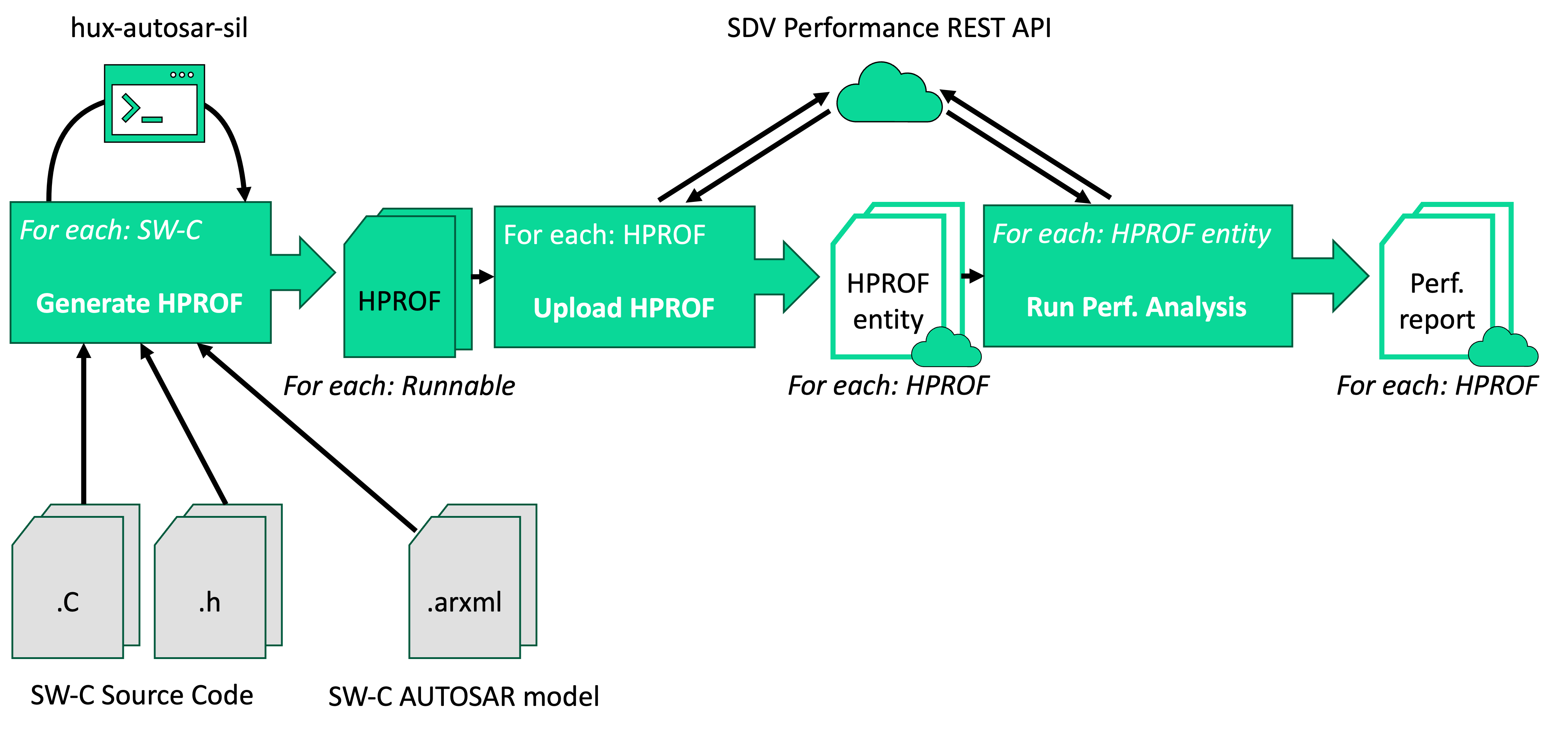
This pipeline targets AUTOSAR-compliant software and generates performance reports for each Runnable Entity in the software.
Pipeline Additional Prerequisites
To implement this pipeline, you will need:
The latest version of the Huxelerate autosar utility installed on the system running the pipeline.
You can download it from the Resources section.
The Huxelerate autosar utility generates HPROF files and uploads them to the platform.
(Optional) If using the cloud for HPROF generation, ensure the system has access to the required cloud storage buckets (see HPROF Generation as-a-service).
Additionally, for each Software Component Type to analyze, you must know:
The location of the software component’s source code (implementation and header files) in your codebase.
The location of the ARXML description models of the software component in your codebase.
(Optional) A CSV file with input data for analysis. Refer to the generate_csv_template command documentation for details.
Step 1: Generate HPROF Files for a Software Component Type
Execution Scope: One execution per Software Component Type in your codebase.
Inputs:
Source code of the software component (implementation and header files).
ARXML description models of the software component.
(Optional) CSV file with input data for analysis.
Outputs:
A LOG file detailing the generation process (success or failure).
For each Runnable Entity in the Software Component Type, one HPROF file (if successful).
Use the generate_hprof command of the Huxelerate autosar utility to generate HPROF files.
Hint: If using the cloud for HPROF generation, refer to the relevant documentation for CLI usage instructions.
Step 2: Upload HPROF Files to the Platform
Execution Scope: One execution per HPROF file generated in Step 1.
Inputs:
REST API token of the user executing the pipeline.
Project ID where the HPROF file will be uploaded.
The HPROF file to upload.
Outputs:
Details of the uploaded HPROF file (ID, name, etc.).
Upload HPROF files using the REST API endpoint:
PUT https://api.sdvperformance.huxelerate.it/v1.0/projects/{id_project}/hprofs
You can associate tags with each HPROF file for easier searching and filtering. Useful tags include:
Software Composition name(s) associated with the HPROF file.
Version of the Software Component Type or System associated with the HPROF file.
Step 3: Run Performance Analysis
Execution Scope: One execution per HPROF file uploaded in Step 2.
Inputs:
REST API token of the user executing the pipeline.
Project ID where the HPROF file was uploaded.
HPROF file ID (from Step 2).
Outputs:
Details of the analysis (ID, name, etc.).
Run performance analysis using the REST API endpoint:
PUT https://api.sdvperformance.huxelerate.it/v1.0/projects/{id_project}/runnable-analyses/
Specify a target hardware (e.g., an ECU Type core) for the analysis. Retrieve available ECU Types and cores using the REST API endpoint:
GET https://api.sdvperformance.huxelerate.it/v1.0/projects/{id_project}/ecu-types/
Result
After completing this pipeline, performance analysis results will be available in the specified project.
Pipeline: Architectural Analysis of AUTOSAR-Compliant Systems
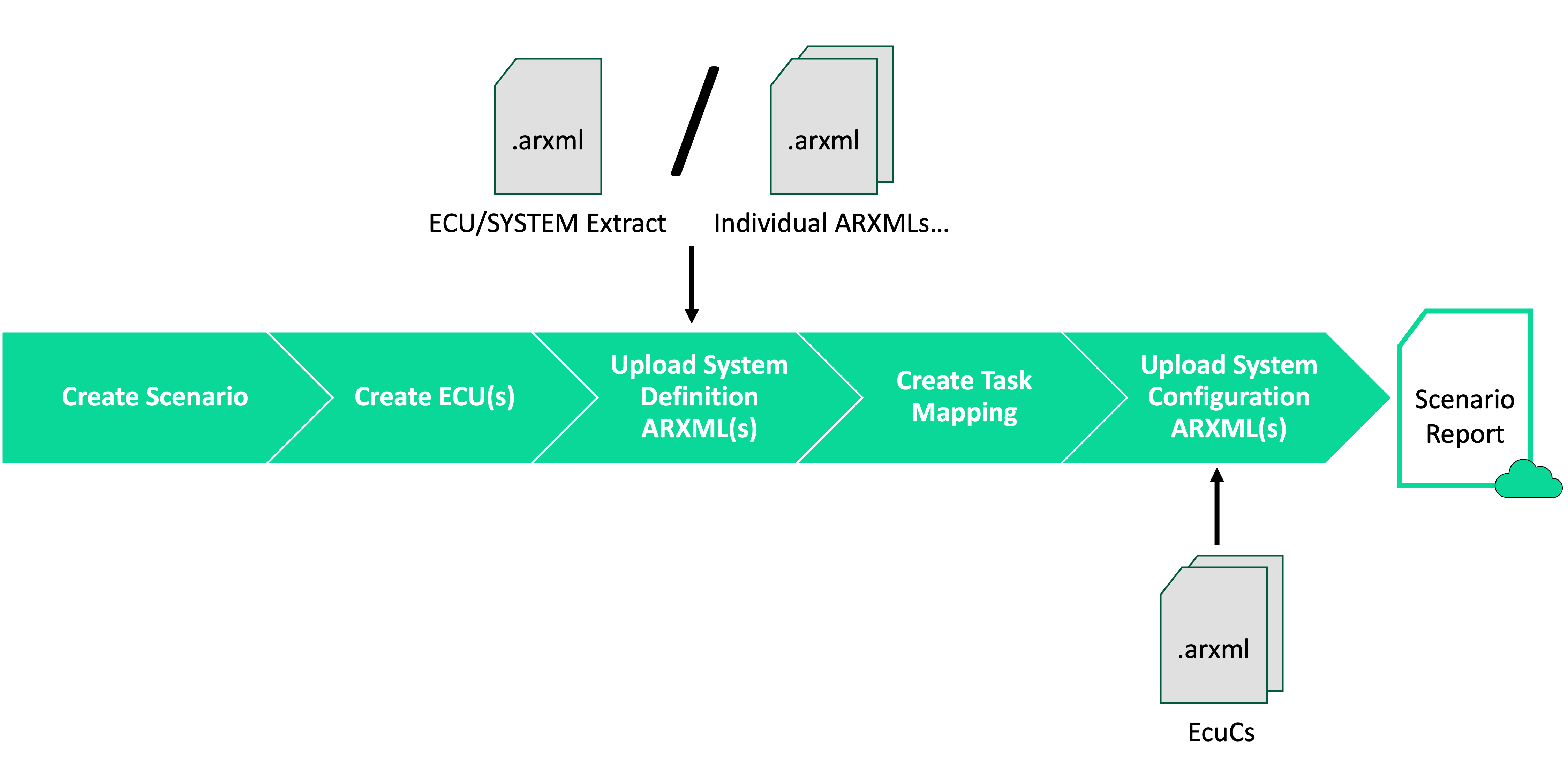
This pipeline targets AUTOSAR-compliant systems and provides structural details independently of the software implementation. Unlike the previous pipeline, it does not require HPROF file generation but relies on ARXML description models.
Pipeline Additional Prerequisites
To implement this pipeline, you will need:
ARXML description models of the system:
Either a single ARXML ECU Extract or SYSTEM Extract file.
Or multiple ARXML files collectively describing the system (e.g., files used in the previous pipeline).
ECU Configuration ARXML files describing, for each ECU in the system, the Runnable Entities (grouped into Tasks) it executes. These files are typically generated by your organization’s ECU Configuration tool (e.g., Vector DaVinci).
Step 1: Create a New Scenario
Create a new scenario to reflect the system’s structure. Use the REST API endpoint:
POST https://api.sdvperformance.huxelerate.it/v1.0/projects/{id_project}/scenarios
Scenarios can be created empty or by copying an existing scenario’s structure. In the latter case, some subsequent steps may be unnecessary.
Step 2: Create ECU(s)
Execution Scope: One execution per ECU in the system.
Create one ECU entry for each ECU in your system using the REST API endpoint:
POST https://api.sdvperformance.huxelerate.it/v1.0/projects/{id_project}/scenarios/{id_scenario}/ecus
Specify the ECU Type when creating an ECU. Retrieve available ECU Types using the REST API endpoint:
GET https://api.sdvperformance.huxelerate.it/v1.0/projects/{id_project}/ecu-types/
Hint: If the scenario was created by copying an existing scenario, this step may be unnecessary.
Step 3: Upload the System Definition
Upload ARXML description models of the system using the REST API endpoint:
POST https://api.sdvperformance.huxelerate.it/v1.0/projects/{id_project}/scenarios/{id_scenario}/system-definition/jobs/swc
This endpoint accepts:
A single ARXML file (ECU Extract or SYSTEM Extract).
Multiple ARXML files in a Zip archive.
Specify the following parameters:
description_standard = "ARXML"for ARXML format files.
Optional parameters to resolve conflicts during upload:
update_duplicates: Update existing elements in the scenario.regenerate_unsupported_uuid: Regenerate non-UUID4-compliant UUIDs.regenerate_duplicated_uuid: Regenerate duplicated UUIDs.
Check upload status using the REST API endpoint:
GET https://api.sdvperformance.huxelerate.it/v1.0/projects/{id_project}/scenarios/{id_scenario}/system-definition/jobs/swc/{id_job}
Confirm successful uploads using:
PATCH https://api.sdvperformance.huxelerate.it/v1.0/projects/{id_project}/scenarios/{id_scenario}/system-definition/jobs/swc/{id_job}

Body: {"confirm": true}
Clear failed jobs using:
DELETE https://api.sdvperformance.huxelerate.it/v1.0/projects/{id_project}/scenarios/{id_scenario}/system-definition/jobs/swc/{id_job}
Step 4: Create a New Task Mapping
Create a Task mapping to map Runnable Entities to ECUs and their cores. Use the REST API endpoint:
POST https://api.sdvperformance.huxelerate.it/v1.0/projects/{id_project}/scenarios/{id_scenario}/mappings
Task mappings can be created empty or by copying an existing mapping’s structure. In the latter case, some subsequent steps may be unnecessary.
Step 5: Upload Task Mapping from ECU Configuration ARXML Files
Upload ECU Configuration ARXML files to populate the Task mapping using the REST API endpoint:
POST https://api.sdvperformance.huxelerate.it/v1.0/projects/{id_project}/scenarios/{id_scenario}/system-definition/jobs/ecuc
This endpoint accepts:
A single ARXML file containing the ECU Configuration.
Multiple ARXML files in a Zip archive.
Specify the following parameters:
description_standard = "ARXML"for ARXML format files.id_mapping: Target Task mapping ID.id_ecu: Target ECU ID (repeat for each ECU in the system).
Optional parameters to resolve conflicts during upload:
update_duplicates: Update existing elements in the scenario.regenerate_unsupported_uuid: Regenerate non-UUID4-compliant UUIDs.regenerate_duplicated_uuid: Regenerate duplicated UUIDs.
Check upload status using the REST API endpoint:
GET https://api.sdvperformance.huxelerate.it/v1.0/projects/{id_project}/scenarios/{id_scenario}/system-definition/jobs/ecuc/{id_job}
Confirm successful uploads using:
PATCH https://api.sdvperformance.huxelerate.it/v1.0/projects/{id_project}/scenarios/{id_scenario}/system-definition/jobs/ecuc/{id_job}

Body: {"confirm": true}
Clear failed jobs using:
DELETE https://api.sdvperformance.huxelerate.it/v1.0/projects/{id_project}/scenarios/{id_scenario}/system-definition/jobs/ecuc/{id_job}
Result
After completing this pipeline, explore the interactive System Structure report at:
https://sdvperformance.huxelerate.it/projects/{id_project}/scenarios/{id_scenario}/system/scenario
Replace {id_project} and {id_scenario} with the respective IDs used in the pipeline.
Pipeline: System-level Performance Analysis
After having performed both:
the performance analysis of your software (for example, using Pipeline: Performance Analysis of AUTOSAR-Compliant Software), and
the architectural analysis of your system (for example, using Pipeline: Architectural Analysis of AUTOSAR-Compliant Systems),
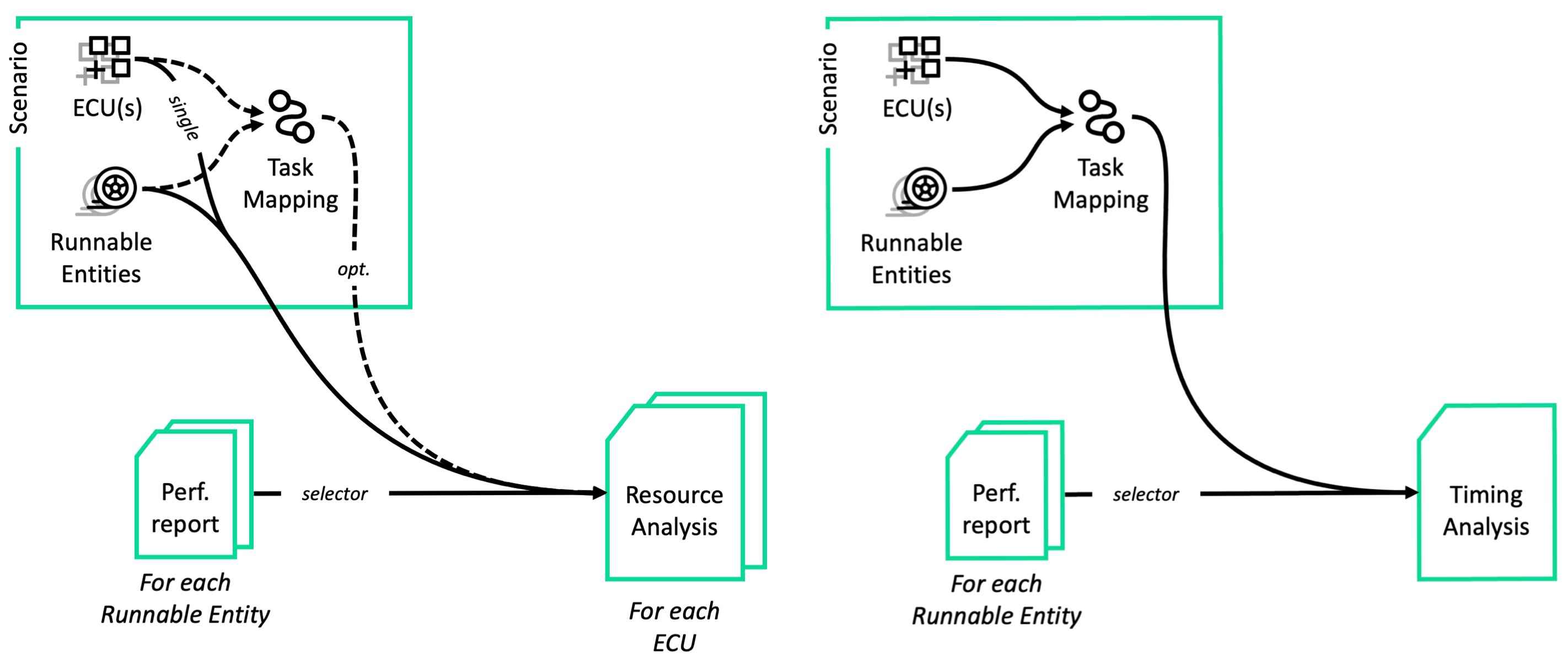
you can run system-level performance analyses to evaluate the overall performance of your system to obtain a comprehensive view of the usage of resources and the timing performance of your system.
This pipeline generates system-level reports focusing both on Resource Usage and System Timing performance.
Pipeline Additional Prerequisites
To implement this pipeline, you will need:
A scenario containing
the definition of the system’s architecture, and
(optionally) the definition of the system’s Task mapping;
For each Runnable Entity in the system, a performance analysis report.
Both these prerequisites can be satisfied, for example, by executing the previous two pipelines (see Pipeline: Performance Analysis of AUTOSAR-Compliant Software and Pipeline: Architectural Analysis of AUTOSAR-Compliant Systems) or a variant of them that better suits your system’s design.
Step 1: Identify the target Scenario’s information relevant to the analysis
Given:
a target project (identified by its ID:
{id_project}),
GET https://api.sdvperformance.huxelerate.it/v1.0/projects
a target scenario in that project (identified by its ID:
{id_scenario}), and
GET https://api.sdvperformance.huxelerate.it/v1.0/projects/{id_project}/scenarios
(optionally) a target Task mapping in that scenario (identified by its ID:
{id_mapping}),
GET https://api.sdvperformance.huxelerate.it/v1.0/projects/{id_project}/scenarios/{id_scenario}/system-definition/mappings
retrieve the list of the ECUs in the scenario (each identified by its ID: {id_ecu}):
GET https://api.sdvperformance.huxelerate.it/v1.0/projects/{id_project}/scenarios/{id_scenario}/system-definition/ecus
Step 2.RA: Create a Resource Analysis for each ECU in the scenario
To create a new Resource Analysis for each ECU in the scenario, use the REST API endpoint:
POST https://api.sdvperformance.huxelerate.it/v1.0/projects/{id_project}/resource-analyses
This endpoint requires the following JSON parameters:
name: A descriptive name for the analysis report.id_scenario: The ID of the scenario to analyze.id_ecu: The ID of the ECU to analyze.hprof_selector: the policy to apply when selecting the Runnable Performance reports to use in the analysis for each Runnable Entity. It can be one of the following:{ "hprof_ids": [...] }: selects the Runnable Performance reports based on their IDs.{ "tag": "{tag}" }: for each Runnable Entity, selects the latest Runnable Performance reports having the specified tag, if any.{}: for each Runnable Entity, selects the latest Runnable Performance report, if any.
Optionally,
"allow_partial_selection": falsecan be added to thehprof_selectorto indicate that the analysis should fail if any Runnable Entity lacks a selected Runnable Performance report.
Moreover, the following optional parameters can be specified:
id_mapping: The ID of the Task mapping to use for the analysis. If not specified, the analysis will assume that every Runnable Entity inside the scenario is mapped to the first core of the first ECU in the scenario.
Once the analysis is created, it will be queued for execution. You can check its status and results using the REST API endpoint:
GET https://api.sdvperformance.huxelerate.it/v1.0/projects/{id_project}/resource-analyses/{id_resource_analysis}
Once the status field of the analysis is ready, the analysis results will be available on the web platform at the URL in the report field.
Step 2.TA: Create a Timing Analysis for the scenario
To create a new Timing Analysis for the scenario, use the REST API endpoint:
POST https://api.sdvperformance.huxelerate.it/v1.0/projects/{id_project}/timing-analyses
This endpoint requires the following JSON parameters:
name: A descriptive name for the analysis report.id_scenario: The ID of the scenario to analyze.id_mapping: The ID of the Task mapping to use for the analysis.hprof_selector: the policy to apply when selecting the Runnable Performance reports to use in the analysis for each Runnable Entity. It can be one of the following:{ "hprof_ids": [...] }: selects the Runnable Performance reports based on their IDs.{ "tag": "{tag}" }: for each Runnable Entity, selects the latest Runnable Performance reports having the specified tag, if any.{}: for each Runnable Entity, selects the latest Runnable Performance report, if any.
Optionally,
"allow_partial_selection": falsecan be added to thehprof_selectorto indicate that the analysis should fail if any Runnable Entity lacks a selected Runnable Performance report.runnable_statistics: either “gaussian” or “maximum”, indicating the statistical method to use for computing the execution time of each Runnable Entity in the analysis.
Once the analysis is created, it will be queued for execution. You can check its status and results using the REST API endpoint:
GET https://api.sdvperformance.huxelerate.it/v1.0/projects/{id_project}/timing-analyses/{id_timing_analysis}
Once the status field of the analysis is ready, the analysis results will be available on the web platform at the URL in the report field.
(optional) Step 4: Compare the analysis results
If you have multiple Resource Analysis or Timing Analysis reports for the project, you can compare them using the REST API endpoint:
POST https://api.sdvperformance.huxelerate.it/v1.0/projects/{id_project}/{[resource|timing]}-analyses/comparisons
In terms of functionality, the comparison reports behave like the individual analysis reports (e.g., they can be shared with other users, and for Resource Analysis they can be summarized in HTML or JSON format).
Result
The system-level performance analysis reports will be available in the specified project after completing this pipeline.
You can access them by browsing the web platform or via the provided share links.