Software Analysis
The analysis of the software can be done at the granularity of the single function/runnable. This means that it is not necessary to have all the source code of the ECU to perform an analysis, nor to compile all the software after code integration.
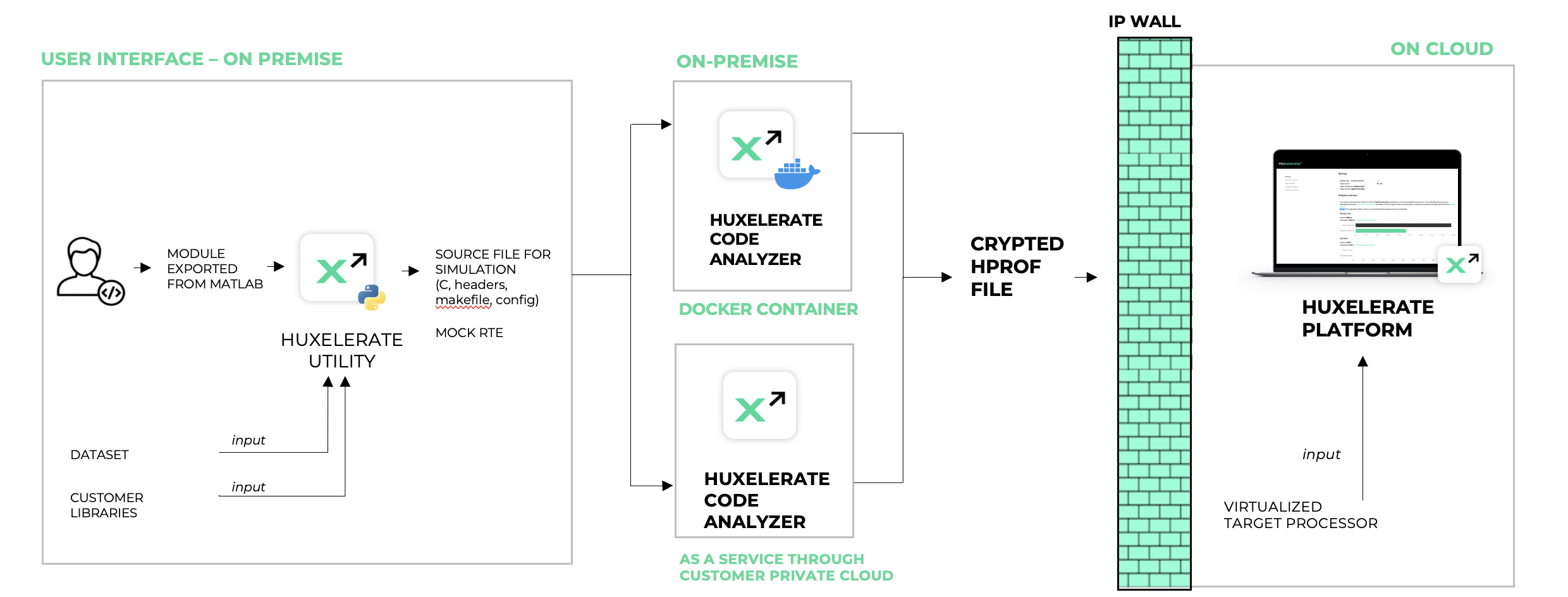
It is possible to analyze any C/C++ software for which it is available the source code. The analysis is performed in three automatic steps:
Generation of a wrapper of the target function to run a SIL (Software-In-the-Loop)
Static and dynamic code analysis of the target function
Generation of the performance report
Step 1. is performed on premise using the workstation of the developer, while step 2. can be either performed on premise (with the support of Docker engine) or as-a-service, using customer’s private cloud (i.e. AWS).
Steps 1. and 2. performed in this way guarantee privacy and security of the source code of the customer, that effectively never leaves the infrastructure of the customer.
The output of these 2 phases is a crypted hprof file. This file does not contain any source code of the function/runnable, but metrics defining the type of operations, memory accesses and details of the function/runnable like its name, periodicity, and name of interesting functions. Name of functions are employed to provide insight on how to optimize your software.
Once the hprof file is generated, it can be uploaded on Huxelerate SDV Platform to obtain a performance report, on multiple target processors.
HPROF file Generation
The generation of the HPROF file is handled by Huxelerate Utility, downloadable from Huxelerate Platform, and available both for specific versions of Python, and as an executable for Windows. The utility accepts multiple input flags, depending on the type of exported source code.
Currently, Huxelerate Utility provides support for three categories of source code:
Autosar Classic compliant modules
Simulink model exported as C code
Bare C code from a different source (i.e. handwritten)
For cases 1. and 2. the usage flow starts from exporting the desired module from Simulink. The code needs to be exported as ANSI C code, preferably without specifying any target board. Exported code, together with:
source libraries
the mapfile containing the symbols of the module
optionally, an input CSV file
can be processed by the Huxelerate Utility to generate a SIL wrapper for software execution and a Makefile for compilation and generation of the HPROF file.
Huxelerate Utility
Huxelerate Utility is provided as a Python script, or as an executable for both Windows and Linux. This software is your interface for the generation of the HPROF file. It:
generates a C program for stimulating the SIL runnables/functions execution for performance analysis purposes (not when used in bare mode)
launch HPROF generation on local machine, or on AWS cloud
The tool reads as input an ARXML file, or an HTML interface definition describing the runnables to test, and generates a corresponding main.c and makefile to compile, instrument and execute the runnables under Huxelerate performance estimator. Optionally, the utility can parse a mapfile to extract the memory mapping of the input/outputs of the runnables and to provide them to Huxelerate performance estimator.
Prerequisites
The executable is self-contained and does not require any additional software to be installed on the machine, however, the Linux executable relies on glibc version 2.27 or higher. Please contact Huxelerate in case you need the utility with a different glibc version.
In case the Huxelerate Utility is downloaded as a python script, the following prerequisites are needed:
Python (make sure to use the correct version for the downloaded utility)
Pip
Pyarmor
lxml
boto3
After installing Python and pip, you can setup your requirements with the requirements.txt file available in this folder
python -m pip install -r requirements.txt
You are good to go.
HPROF Generation on local machine
The generation of HPROF files on your local machine requires to have Docker engine installed on your local workstation. Docker engine offers OS-level virtualization that allows Huxelerate software to perform the analysis of your software in a containarized environment.
Once Docker engine has been installed on your workstation, it is enough to launch using Huxelerate Utility with default flags and the utility will:
create a Makefile with a specific version of Huxelerate Performance Estimator image
download the image of Huxelerate Performance Estimator (only first time)
launch the analysis leveraging the Docker image
generate the HPROF file
HPROF Generation as-a-service
The generation of HPROF files using AWS private cloud relies on AWS Lambda. The main infrastructure is composed of 2 S3 buckets (one for the input files, and one for the outputs) and a Lambda function. Everytime new data is uploaded to the S3 input bucket, the lambda is triggered and automatically performs the analysis of provided input, generating the HPROF file in the output bucket. Huxelerate Utility is engineered to completely abstract all the iteration with the cloud service and will automatically:
Generate the SIL wrapper for the analysis
Upload the generated files to the input S3 bucket
Download the result HPROF file from the output S3 bucket
For the specific flags to specify when using HPROF generation as-a-service please refer to the specific section.
It is possible either to install the HPROF generation service on your private AWS cloud, or use the one provided by Huxelerate. In any case, the connection with the service requires authentication either with AWS IAM or using SSO login with your company credentials.
Credentials retrieval via config file (IAM)
Please create the following file:
C:\Users\[your-user]\.aws\config
Note that the file has no extension.
The file format has to be as follows (more info at https://boto3.amazonaws.com/v1/documentation/api/latest/guide/credentials.html#aws-config-file):
[default]
aws_access_key_id=foo
aws_secret_access_key=bar
Access Key Id and Secret Access Key have to be populated with the one provided to access the service.
Credential retrieval via SSO Login
Retrieve your credentials using the command (remember to specify a name for the profile when prompted):
aws configure sso
Store the profile name you have defined in the prompt and use it to set the environment variable AWS_PROFILE
set AWS_PROFILE=<profile_name>
Usage of the tool via a VPC endpoint
The tool offers the possibility to specify a VPC endpoint to use for the connection with a defined bucket. The VPC endpoint can be specified using the -e flag, or by setting the environment variable HUX_AWS_VPC_ENDPOINT_URL
Huxelerate Utility Usage
For a complete list of flags and functionalities linked to the utility, please refer to the information available by calling the helper function of the utility:
python hux-autosar-sil.py -h
The Utility provides 4 commands:
generate_hprof: performs all the steps for the generation of the HPROF file, from the creation of the SIL wrapper archive, to the generation of the HPROF
generate_hprof_from_archive: performs the generation of the HPROF file starting from a SIL wrapper archive, skipping the generation of the SIL Wrapper
check_hprof_status: mainly used with as-a-service HPROF generation, checks the status of the generation of an HPROF on the cloud, and in case it is ready it downloads it
generate_csv_template: generate a csv template with the input stimuli / measures for the simulation
generate_hprof command
This command allows to perform all the steps for the generation of the HPROF file, and in particular:
Creates the SIL wrapper archive for the analysis
Runs the HPROF generation locally, or on AWS if the specific flag is specified.
The utility supports three different flows:
It is possible to specify which flow to follow by specifying:
-i flag for Autosar Classic modules, to specify the either the folder of the ARXML files, or the file itself
-is flag for Simulink models, to specify the <module_name>_interface.html file
–bare flag for bare C source code
For all flows, the utility requires to specify the sources for the analysis by means of .c and .h files. The first can be specified with the -c flag, while the second using the -I flag. Both flags can be specified multiple times. These two flags are used by the util to create a Makefile, with the specific include paths and source files to compile and analyze the software.
To stimulate the software with specific dataset/measures, it is possible to specify a CSV file containing the inputs with -v flag. Note that this flag is note defined with –bare flag. For instruction on the file format, please refer to this section.
The run of this command generates the following outputs:
a zip file containing all the generated files (mock RTE) for the SIL
the HPROF files of the runnables/software analyzed
Both outputs can be organized using the flags -z to specify a name for the zip file, and -ho to specify a name for the HPROF.
Analyses can be carried on locally, or on AWS as described in the specific section
By default, the generate_hprof command performs both SIL wrapper archive generation, and the generation of the HPROF file. It is however possible to generate only the SIL wrapper archive, specifying the -g flag. The utility will terminate the processing once the archive has been generated, to allow code inspection before HPROF generation. It is then possible to generate the hprof using the generate_hprof_from_archive command
generate_hprof_from_archive command
This command generated the HPROF file starting from a SIL wrapper archive, skipping the creation of the SIL itself. It can be used to re-generate an HPROF file, starting from a previously created SIL wrapper archive, or as a subsequent command of the generate_hprof command with the -g flag specified. The command is standard for each flow, and accept HPROF generation on AWS.
An example command to generate an hprof in output_hprof_fullpath starting from a SIL wrapper called <input_sil_wrapper> and with generation on AWS is:
python hux-autosar-sil.py generate_hprof_from_archive -z <input_sil_wrapper> -ho <output_hprof_fullpath> -a -b <bucket_name>
check_hprof_status command
This command can be used when an asynchronous processing has been triggered, to check if the generation of an HPROF file on AWS has completed. If the file is available, the command will automatically download it on your local machine.
python hux-autosar-sil.py check_hprof_status -z <input_sil_wrapper> -ho <output_hprof_fullpath> -b <bucket_name>
The example command above, is used to check the generation of the HPROF file that - if successfully generated - will be downloaded to output_hprof_fullpath. The input sil wrapper is <input_sil_wrapper>.
generate_csv_template command
This command generates a CSV file template, containing the input stimuli for the simulation. The template can be populated by the user with specific measures to analyze the runnables/functions in a real-case scenario, to get a more insightful analysis.
See the section in the specific flow to see example commands to generate the CSV template.
Local vs cloud generation of HPROF files
By default, the generation of HPROF file is performed on the local workstation, and requires to have Docker engine installed. In the example above, the analysis is performed leveraging a proprietary cloud service available on AWS cloud. The flags that specify this behavior are --aws and -b. The flag --aws is to specify the HPROF generation on AWS cloud, while the -b flag is used to specify the name of the bucket to use for the generation of the HPROF on AWS. The two flags need to be defined together if the analysis is performed in the cloud. The name of the bucket can be also defined using the HUX_AWS_BUCKET_NAME environment variable.
From a performance perspective, the generation of HPROFs is based on AWS lambda, that can be invoked cuncurrently exploiting the parallelism offered by AWS Lambda infrastructure.
When the HPROF generation on AWS is chosen, the utility automatically uploads the zip file containing the sources, and waits for the generation of the HPROF file, or for a failure. When the HPROF file is generated, it is automatically downloaded by the utility to the local workstation. It is possible to launch the AWS Lambda process asynchronously by specifying the -y flag and then use the check-hprof-status command to check the processing status and download the HPROF file at a later stage.